

In the packaging industry, design is something that can never be overlooked. It attracts the customers, looks stunning from the shelves, and becomes the reason for choice among thousands of competitors. The packaging design, when made with both functionality and creativity, can promote customer engagement and stay in the consumer's mind for years. AI tools are now widely used in packaging to make those designs creative, captivating, and memorable. Several free and paid tools have made it easier for designers to create mockups, try color combinations, adjust visuals, and change typos in one click.
Using AI tools in packaging design has several benefits. It can save you time and money. It can also provide you with hundreds of design ideas with a single click. A survey in 2025 found that 77% of packaging companies have strong to moderate intentions of using AI tools in their design process. And 1 out of 4 of those companies has already started training their AI models for creative designs.
It shows how important it is to consider using AI for packaging design. This blog is created to educate companies and brands on how to use AI for designing product packaging.
Importance of AI Tools in Packaging Designs
AI is important to use in the product packaging design process, as it can provide the following benefits.
Creative Design Ideas
AI can generate countless design ideas in one click. There is no need to stick to one layout. You can try thousands of patterns and combinations for your product and finalize the one that looks good to you.
Smooth Designing Process
AI can streamline your design process from idea to execution. It can suggest colors, typos, visuals, and layout. It can also generate mockups and finalize the design based on your preferences.
Saves Time and Money
AI can manage multiple tasks that you could otherwise hire human designers to manage. That's why it can save you a lot of time and cost.
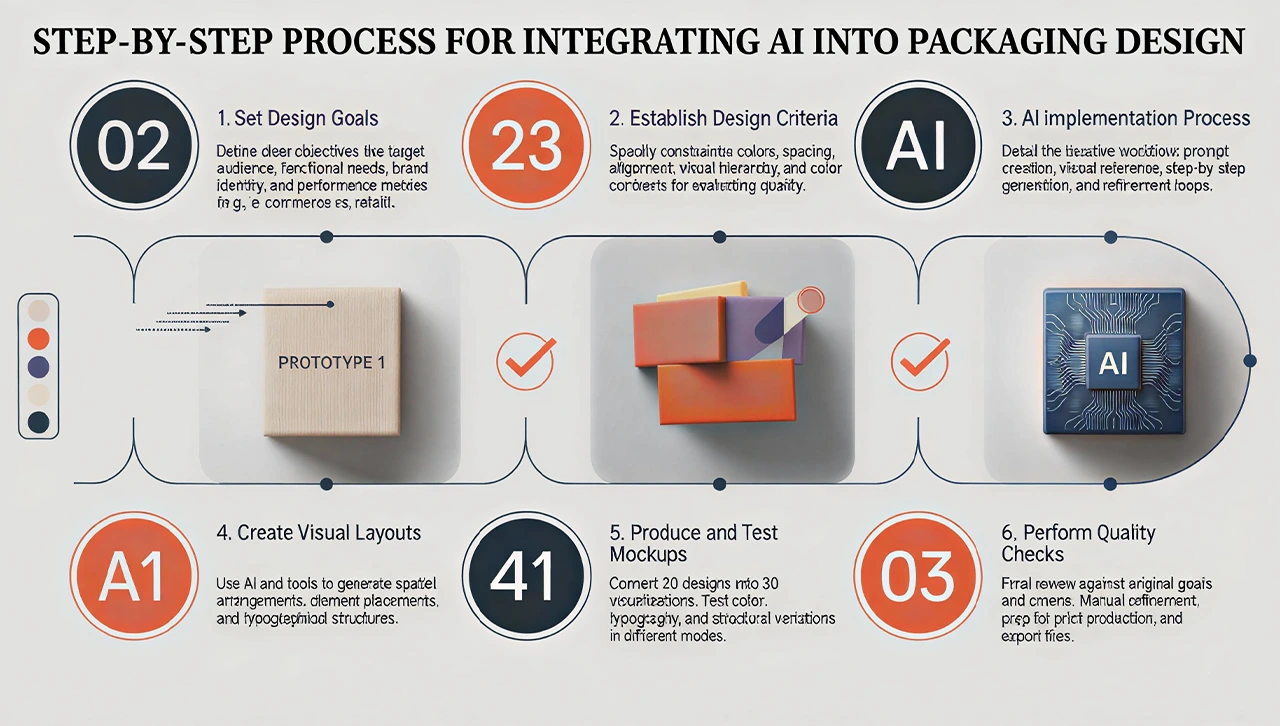
Step-by-Step Process of Using AI for Packaging Design
Before using AI tools, you should set a complete process for how you will benefit from them for your packaging designs. Sticking to the process and doing things step by step will yield better output.
At The Box Lane, we use AI tools for packaging designs. We tried multiple processes, tested multiple tools, and compared their results. The following is the process that yielded the best outcomes in our case. You can implement this, too, to get similar results.
-
Set Design Goals
Before doing anything, decide what your design should do. Ask yourself what you want to achieve via this design. More sales, more engagement, or you want your products to be remembered for years. Decide clearly that this design will be used as a wrap-up of physical products, visible on retail store shelves. Or you want to use it on Shopify stores or Amazon to be scrolled on mobile devices and desktop screens.
Once you finalize these things, set up clear goals for your product design. Ask yourself, which specific line will ideally get maximum attention? Which specific words will remain memorable? What actions should customers take after seeing the CTA? Describe these things clearly, and note them down, setting up goals for your design.
-
Set Up a Criterion for a Good Design
This is the crucial step, as AI can sometimes create average or bad designs. You should first set a criterion for a good product design. Decide strictly on how many colors your design should include. What should be the ideal spacing, alignment, visual hierarchy, and color contrasts? You can also use AI tools to help you set those criteria for good design.
Setting up these criteria is essential, as you will compare your AI-generated design against the criteria at the end. We recommend this step specifically, as AI tools can sometimes just build beautiful designs that look captivating to designers themselves. However, such designs lack functionality and fail when it comes to real presentation before the actual audience. That's why we set and recommend setting the criteria first.
-
Finalize a Design Process
Creating product designs with the help of AI is not a single-step process. It involves multiple small steps. Each step needs careful monitoring and execution. The ideal strategy is to go step by step. Describe your clear steps for your design journey, from an idea in mind to the final, designed product packaging.
For example, your design process could include steps like finalizing colors and typos, creating a visual layout, and producing mockups. Make sure your design process is explained and sophisticated, and each upcoming step uses the output of the previous one.
-
Create Prompts
AI tools need textual prompts or visual references to create designs of your preference. For each step, you need a specific prompt that guides the tool on how to finalize a design. Take a look at the steps you finalized in the previous step. Now, prepare a specific prompt for every step so it is executed in the right order.
You can use the same or some other AI tools to help you with creating prompts for each step. Describe the complete process for the tool, your criteria for a good design, and your goals for the design, and ask the tool to provide you with complete prompts for each step. Do the manual changes in the prompt according to your personal preferences.
-
Design Step by Step
Now, you have everything you need for creating a design with AI. Start with the first step and give the first prompt. Check it, finalize it, and move to the next step by giving the next prompt. Do the same for the entire process, and at the end, you will get your final product ready.
Check the output of each step manually and ensure it fulfills the criteria. If at any step, the output doesn't fulfill the criteria, get it modified before moving to the next step. You can also change the prompt wherever necessary.
-
Test Various Versions
Once you get your final design made, test it for various typography styles, color combinations, and visual layouts. You can also get its outputs for light and dark screen modes. At this stage, you can also ask the AI tool to create multiple versions of the final output in different styles. You can then run A/B testing for those designs and choose the one that performs the best.
-
Do a Quality Check
This is the step where you check your design against the criteria and the goals you set up. Check whether the design is ready to achieve your goals. Also, check whether the design is now ready for printing. Identify the weak areas and improve them via refining and modification.
Relying blindly on AI tools is not a good practice. You should also do the manual work. For example, AI can sometimes compromise the quality of the elements just to make a single change in your design. To prevent these things, try to fix minor changes yourself in any design tool that you usually use.
-
Export and Use
Export the design in your required dimensions and file types and use it wherever you want. Remember, the product designs for online stores require different parameters than those used as covers for products sold in retail stores. If you sell your goods both online and in retail stores, you may need a meticulous strategy to create a design that looks good on both store shelves and mobile screens. In this case, the entire criterion, steps, and design creation process might need refinement.
Top AI Tools Product Packaging Designs
A lot of AI tools can spark emotions by creating stunning designs. Let's have a look at some of them, which can help you in product packaging design.
Canva AI Tools
Canva has added multiple AI tools for image and design creation. These tools include prompt-to-design, text-to-image, and text-to-video tools. You can access some of its design tools with a free account. The complete set of tools is, however, accessible via a premium subscription.
Fotor AI
Fotor is also a design tool with many AI-based image and video generation tools. It is a free tool to try and use a credit-based system. You get some credits for free initially. To create more designs, you need to buy credits.
Midjourney
It is one of the most powerful text-to-image generator tools. It offers no free trial, and you only need to buy a subscription plan. The tool offers multiple image generation features. It is also easy to use. You have to open a chat section, go to newbies, and type your prompt. It provides 4 images as a result, and you can choose the one that is the best.
Mistakes to Avoid When Using AI Tools for Packaging Design
AI tools can elevate your packaging designs when used wisely. These tools can sometimes hallucinate and provide outputs that make human users frustrated. Most often, the issue is in the prompt. When you give poorly explained or vague prompts, AI can compromise the quality of output. To prevent such issues, avoid the mistakes mentioned below.
Relying On Generic Prompts
Generic or vague prompts produce generic results that don't meet the criteria. Use detailed, explained prompts to create something truly useful.
Neglecting Print Technicalities
AI often produces RGB color and low-resolution designs suitable for digital screens. To convert them into CMYK and high-resolution designs, you need clear prompts.
Ignoring Intellectual Property and Trademarks
AI generates designs that are very similar to already published work. It involves a huge risk of copyright claims. Always check for originality before finalizing images.
Get Premium Packaging Designs with The Box Lane
At The Box Lane, we create packaging designs that are both beautiful and functional. Our designers use AI tools and human quality assurance to create packaging that is loved, purchased, and remembered. Contact us today to get a custom quote for your product packaging.
FAQs
Can AI design product packaging from scratch?
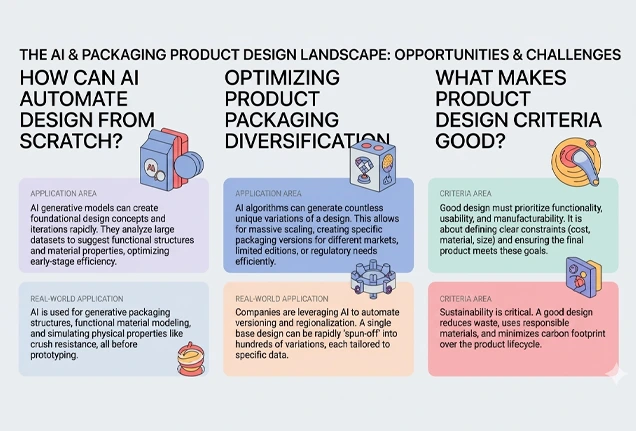
Yes, AI can design product packaging from scratch. But it needs precise, step-by-step prompts in this process. A human should be there who checks the results manually and modifies them if anything needs refinement.
Can I design product labels with AI?
Yes, you can design product labels with AI. Choose the AI design platform, paste your prompt, and get labels ready to print. Make sure your prompt is complete and detailed, mentioning colors, theme, typos, and everything that you want to get in labels.
How to design my brand logo with AI?
Choose the AI design platform first. Write a detailed prompt about your business, operations, ideal audience, color scheme, tagline, etc. Explain which type of logo you want and where you have to use it. Hit the enter button and check the result. Modify your logo by giving additional prompts to the tool.
What are the criteria for a good product design?
A good product design is good at looking, useful, easily understood by the target audience, and speaks to the brand's core operations. It is also aesthetically pleasing and easily recognized by ideal customers when seen from a distance.
What are some free AI tools for designing product packaging?
Top free AI packaging design tools include Canva, Fotor AI, and Packify AI. Some of their features are available for free, while many premium features require a subscription.